Proposal and live demonstration · all player data shown is fictional
Football Medical Management System

Where clinical care meets athletic performance

Every player’s medical status. One place. Always current.

A single platform where the medical team records injuries, rehabilitation and clearance decisions, and coaching staff see who is available the moment it changes. Built for [Club].

AvailableAvailable with restrictionsModified trainingRehabilitationUnavailableAwaiting assessment
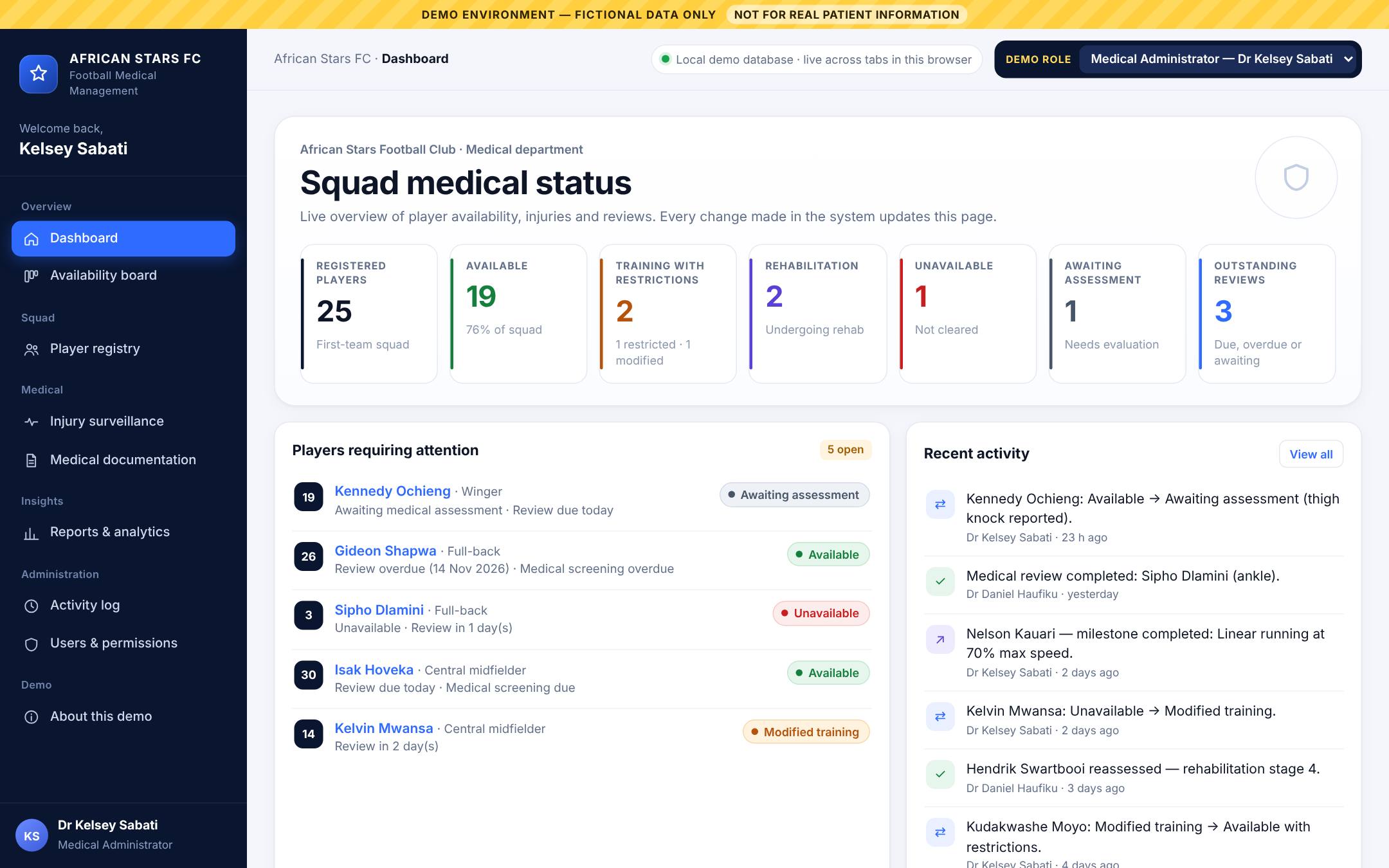
FMMS dashboard showing squad medical status: 25 registered players, 19 available, 2 training with restrictions, 2 in rehabilitation, 1 unavailable, 1 awaiting assessment
The problem it solves

Medical information is scattered. Decisions shouldn’t be.

01

Fragmented records

Injury notes, screening results and treatment plans sit in notebooks, spreadsheets and individual phones. When staff change, the history goes with them.

02

Updates by WhatsApp

Availability is passed on in messages that get buried, forwarded or misread, and confidential details end up in group chats.

03

Coaches plan in the dark

Coaching staff need to know who can train, with what restrictions, and when the next review is, without chasing the medical team for it.

How it works

One update from the medical team. Everyone sees it.

A winger pulls up with a hamstring injury in a match. This is what happens in FMMS.

Record

The club doctor logs the injury on the player’s profile: location, mechanism, diagnosis, severity and plan.

Decide

The treating clinician sets the player to Rehabilitation, adds restrictions and a review date, and confirms the decision as their own.

Update

The dashboard, availability board, injury surveillance and activity log recalculate straight away. No refresh, no message.

Plan

The head coach and S&C coach see the new status and restrictions on their own screens. The diagnosis stays with the medical team.

The system records clinical decisions. It never makes them. A player’s availability changes only when an authorised clinician changes it and signs for it.

The platform

Six modules, one record per player

Availability & return to play

Who can train today

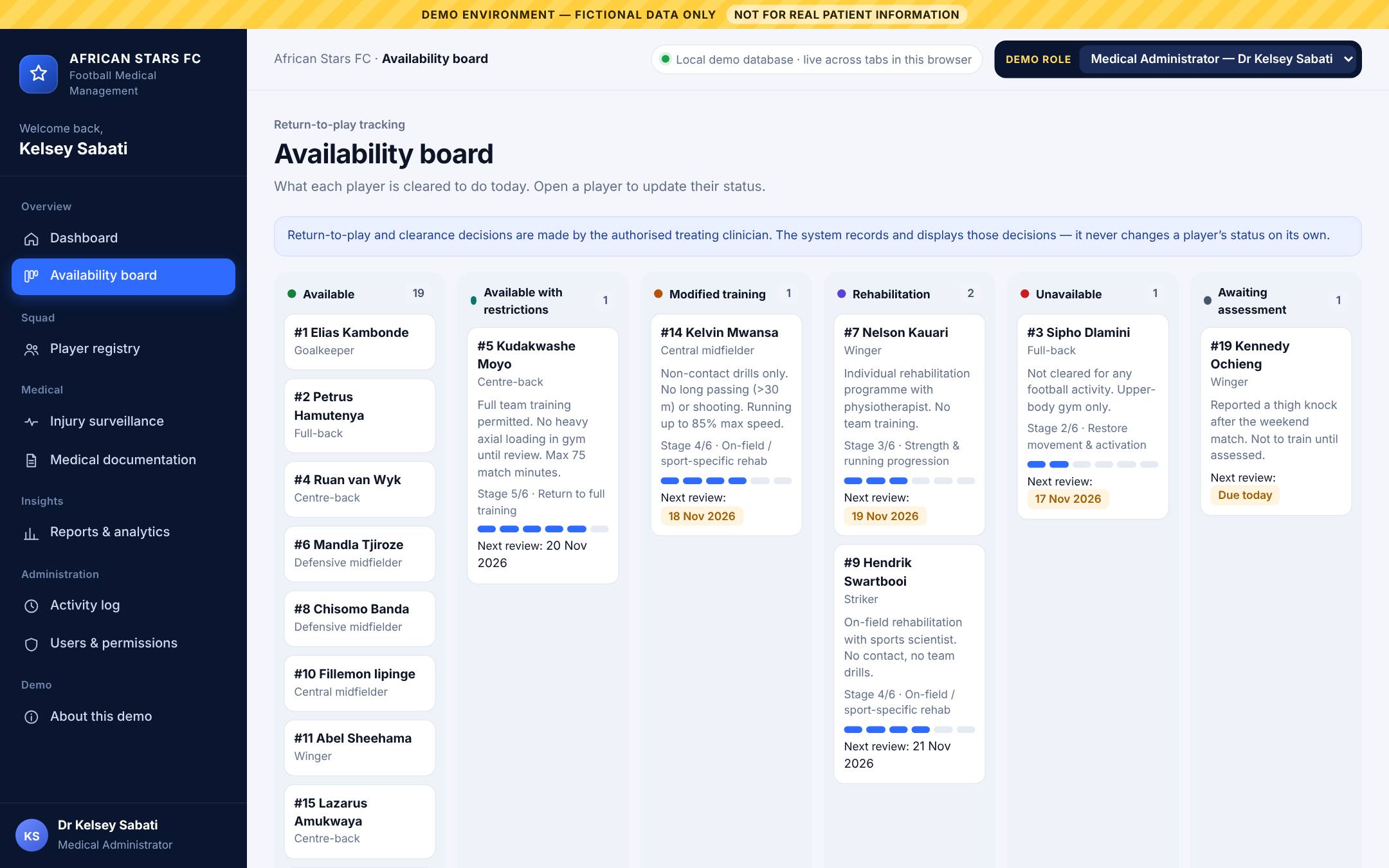
Every player sits in one of six statuses, with the restrictions, rehabilitation stage and next review date that go with it.

  • Status changes require clinician confirmation
  • Full history of every availability decision
  • Coaching staff see restrictions in plain training language
Availability board with players grouped into six status columns, each card showing restrictions and next review
Player medical profiles

The whole story in one place

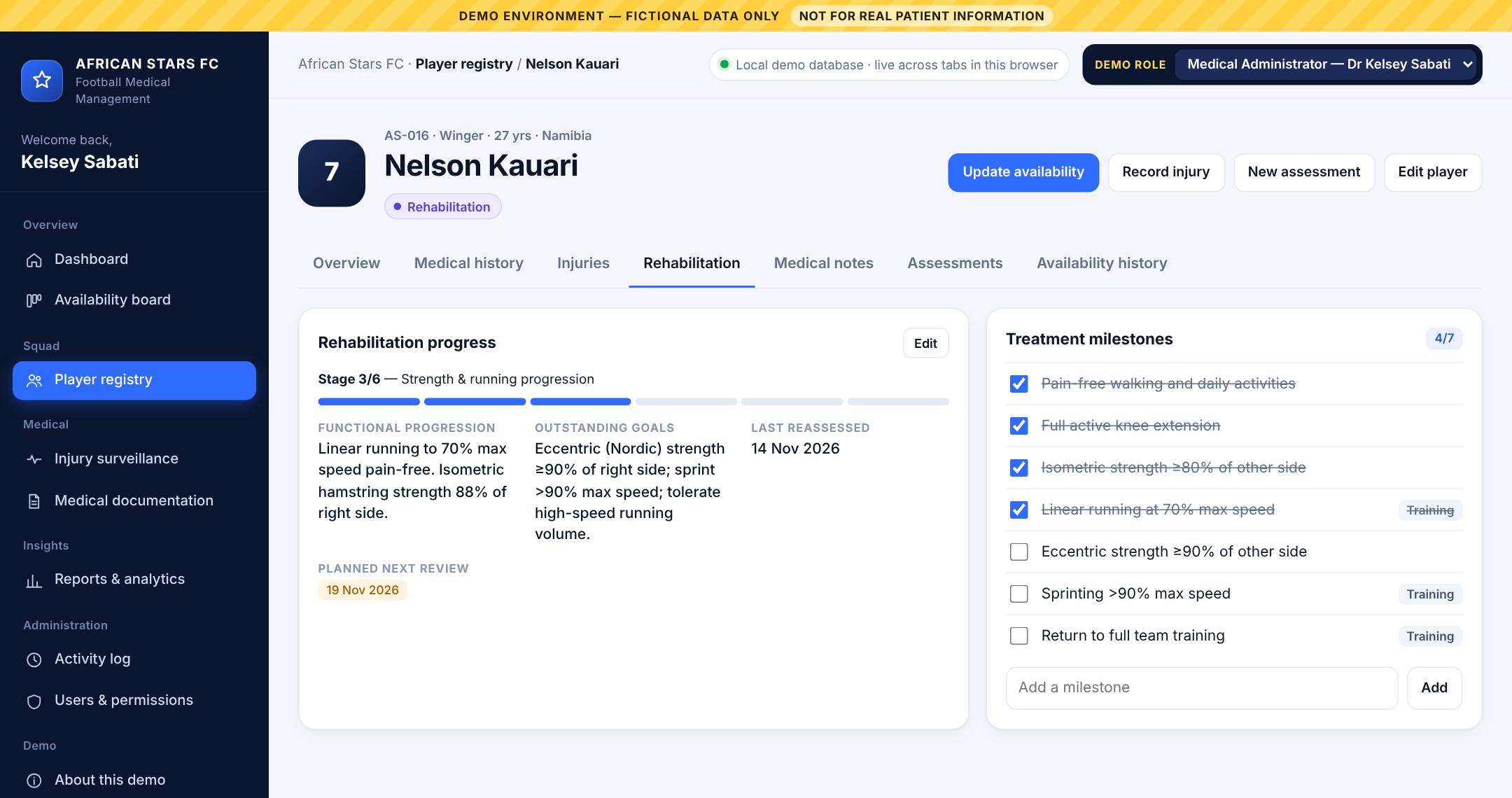
Personal details, medical history, current and previous injuries, rehabilitation milestones, signed clinical notes, completed assessments and availability history.

1 Protection2 Movement3 Strength & running4 On-field rehab5 Full training6 Return to play
Player profile rehabilitation tab showing stage 3 of 6, functional progression and treatment milestones
Injury surveillance

See the patterns

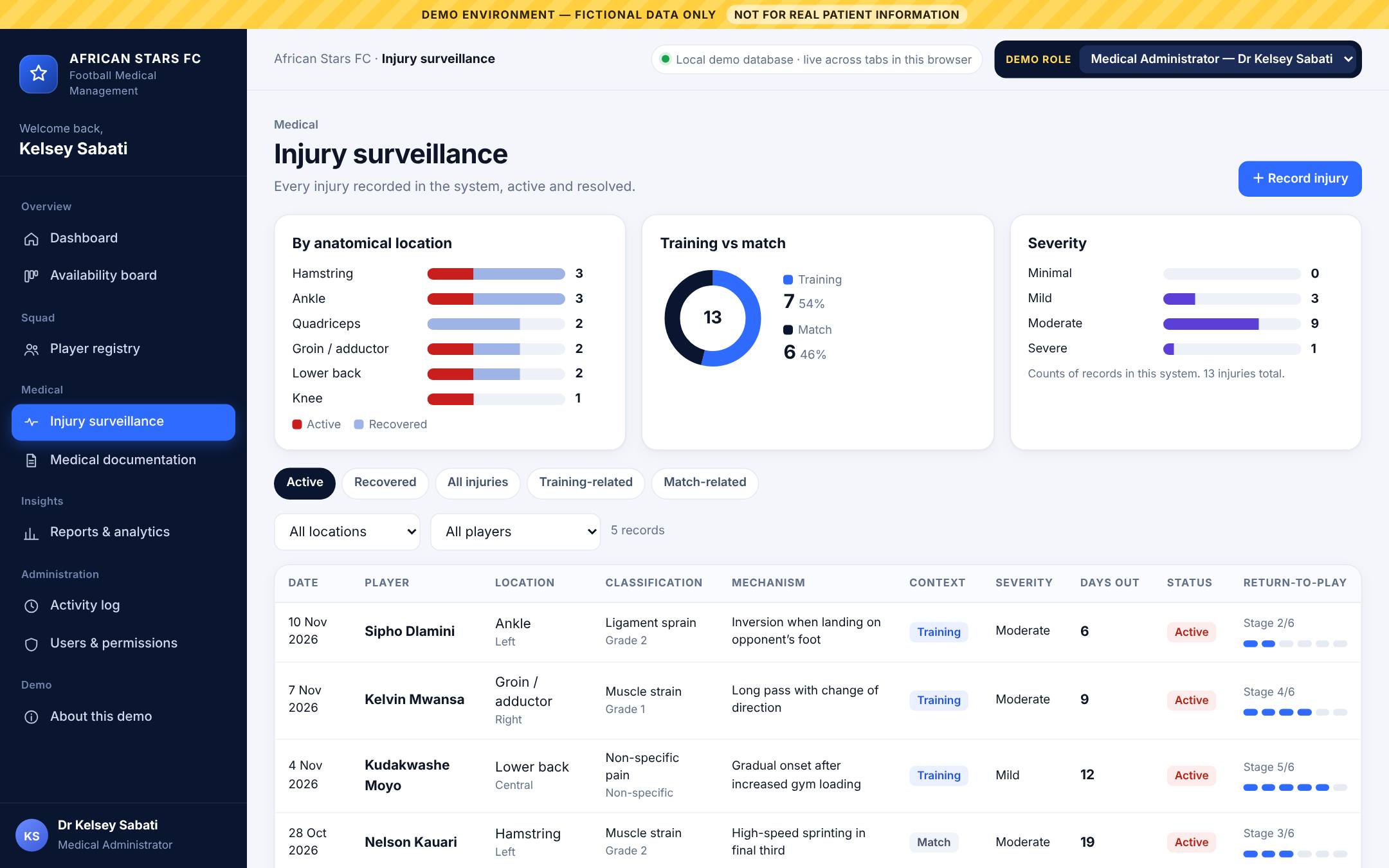
Every injury is recorded in the same structure, so the squad picture builds itself: by body area, injury type, training versus match, severity and days lost.

  • Filter active, recovered, training or match injuries
  • Return-to-play progress on every record
  • A coaching view for planning training, without names or diagnoses
Injury surveillance page with charts by anatomical location, training versus match and severity, above a table of injuries

Squad dashboard

Seven live counts, the players who need attention today, and every recent change with who made it.

Medical documentation

Eight structured templates, from pre-participation screening to emergency incident reports, each filed to the player’s profile.

Reports & analytics

Totals, injury distribution and rehabilitation progress, counted from the records. No predictions and no invented trends.

Who sees what

Clinical detail for clinicians. Clear answers for coaches.

Access is enforced where the data is served, not only by hiding buttons. A coach who types a clinical page’s address directly gets “access restricted”. Club management has no access to the platform.

InformationMedical administratorClub doctorPhysiotherapistHead coachS&C coach
Player registry & availabilityFullFullFullViewView
Restrictions & review datesSetSetSetViewView
Rehabilitation milestonesFullFullFullTraining-relevant onlyTraining-relevant only
Injury surveillanceNamed, full detailNamed, full detailNamed, full detailNo names or diagnosesNo names or diagnoses
Diagnoses, history, medication, notesFullFullFullNo accessNo access
Change availabilityYesYesYes, except final clearanceNoNo
Users, permissions & audit logYesNoNoNoNo

What a coach sees on a clinical tab

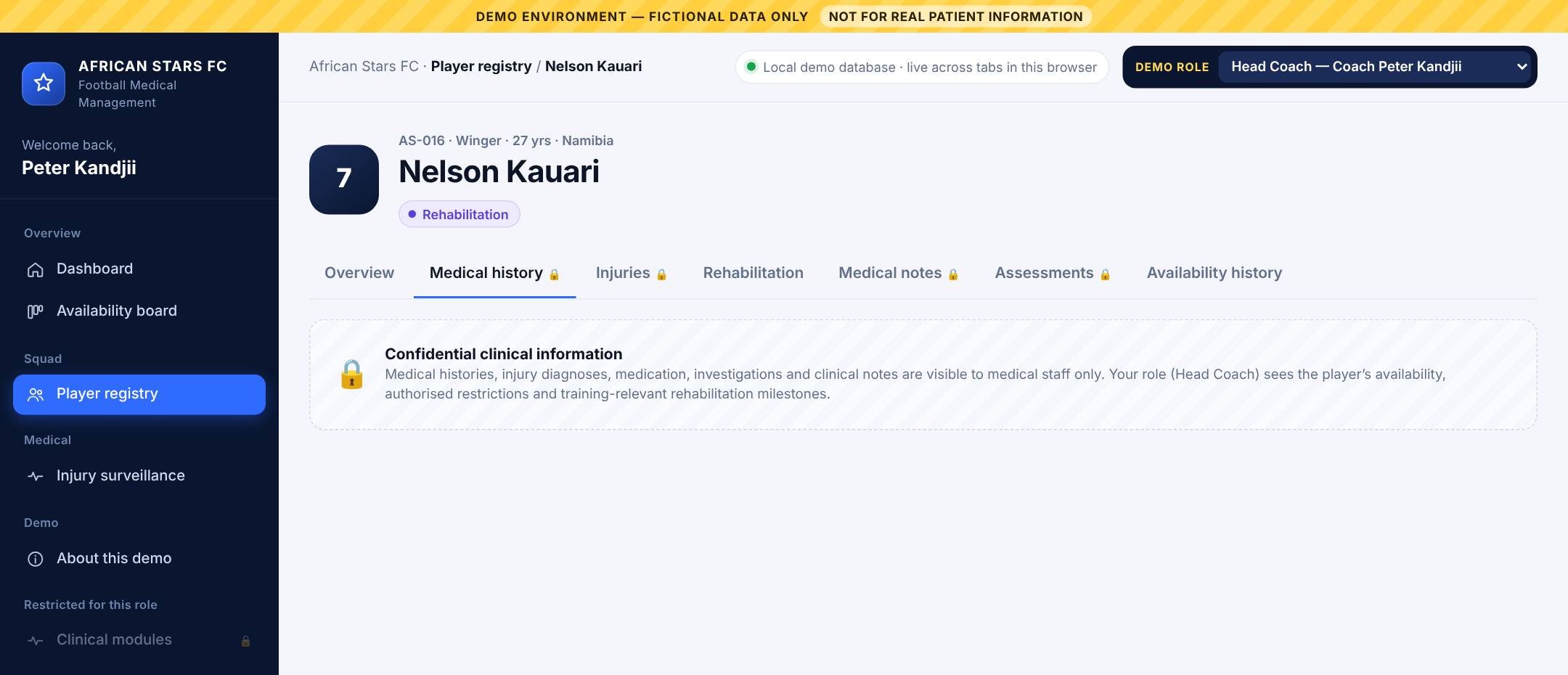
Coaching staff open the same player profile but find the confidential sections locked. The injury coaching view is not anonymous in a squad this size, so what coaching staff may see should be agreed in the players’ medical consent form.

Player profile viewed by the head coach, with the medical history tab showing a locked confidential panel
Clinical safety & confidentiality

Designed around clinical responsibility

1
No automated clearance

The system never changes a player’s status on its own. Return-to-play decisions stay with the treating clinician.

2
Every decision is signed

Each status change records who made it, when, and the clinician’s confirmation that it is their own judgement.

3
Recovered isn’t cleared

Closing an injury record does not clear the player. Clearance is a separate decision.

4
Need-to-know access

Five roles, each seeing only what its work requires. Clinical and operational information are kept apart.

5
Full audit trail

Every change is logged with user, role and time, visible to the medical administrator.

6
No outside sharing

Player data is not sent to external databases or AI services.

Pitch-side ready

Works on the phone in your pocket

The same system runs on phones and tablets, so the medical team can update a player from the training ground and the coach sees it before the session starts.

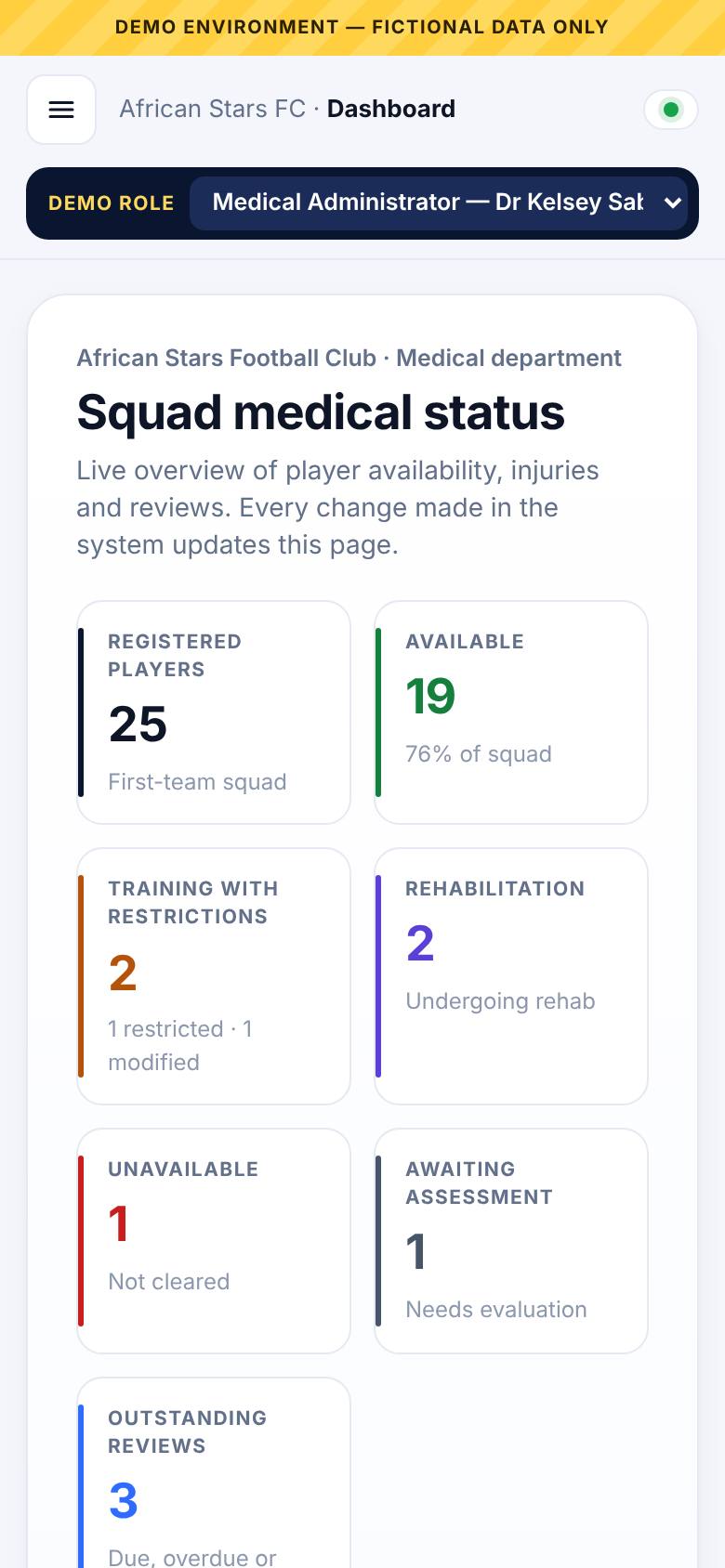
FMMS dashboard on a phone screen
From demo to club system

What exists today, and what comes next

In the live demo today

  • Player registry, profiles, injuries, rehabilitation and notes
  • Availability tracking with signed clinician decisions
  • Injury surveillance, reports and eight documentation templates
  • Five roles with enforced access, including the physiotherapist
  • Live updates across open screens
  • 25 fictional players. No real player data.
Phase 1
Medical team pilot

First-team squad, medical staff only. Replace paper and spreadsheets for injuries, screening and rehabilitation.

Phase 2
Coaching access

Head coach and S&C coach join once consent wording and access rules are agreed.

Phase 3
Review and extend

Review with the club after a full period of use, then decide on further squads and features.

Try it yourself

A five-minute walkthrough

Use the “Demo role” switcher in the top bar of the demo to see each user’s view. Open it in two browser tabs to watch updates arrive live.

  1. Start as Medical Administrator.Read the dashboard: squad counts, players needing attention and recent activity.
  2. Record an injury.Open a player from the registry, choose “Record injury”, set the status to Rehabilitation and confirm as the treating clinician.
  3. Watch it ripple through.Return to the dashboard and availability board. The counts, board and activity feed have already changed.
  4. Switch to Head Coach.Same player, same status and restrictions. Try the Medical history tab: it’s locked.
  5. Switch to S&C Coach.Open Injury surveillance to see the squad’s injury patterns without names or diagnoses.